EHTracker: Difference between revisions
Maximum Joe (talk | contribs) |
Maximum Joe (talk | contribs) No edit summary |
||
| Line 1: | Line 1: | ||
EHTracker is a torrent tracker used for downloading and uploading [[E-Hentai Galleries|galleries]]. | EHTracker is a torrent tracker used for downloading and uploading [[E-Hentai Galleries|galleries]]. Such torrents can be downloaded by users and by those without accounts. | ||
==Galleries With Torrents== | ==Galleries With Torrents== | ||
Revision as of 14:41, 10 May 2015
EHTracker is a torrent tracker used for downloading and uploading galleries. Such torrents can be downloaded by users and by those without accounts.
Galleries With Torrents
- All torrents are listed here.
- Galleries with torrents linked to them are marked with a

- Searches may also be done specifically for galleries that have torrents linked to them.
- An RSS feed can be found here:


Creating Torrents
Users can add a torrent for a gallery by uploading it through the window opened when clicking on a gallery's "Torrent Download" link. The maximum torrent file size is 10 MB.
Each gallery has its own announce tracker address that needs to be used when creating the torrent. This address is indicated in the aforementioned window, and looks like this:
http://ehtracker.org/{gid}/announce
The gallery ID ({gid} in the address above) is the number that is present in the gallery address just after the /g/ part. For instance, if the gallery address is "http://g.e-hentai.org/g/123456/239ac3959a/", its ID is 123456 and its key is 239ac3959a.
 Note: For a user's stats to be recorded they must download the .torrent file created by the site after uploading theirs (this is a user's personalized torrent file).
Additional Files
The EHTracker is meant for seeding galleries, which may include additional content that may be associated with the gallery that are not compatible with the E-Hentai User Gallery System, such as .bmp, .html, and .swf files.
Limits
- The torrent system will not allow users to upload torrents if they have more than 10 torrents with no completions uploaded within the last 24 hours.
- At this time it is recommended NOT to use the qBitorrent client for creating torrent files.
- Any client used must support either no_peer_id or compact format.
Expunges
- Torrents can operate even if the gallery to which they are linked is expunged, removed, or deleted.
- Just like galleries, torrent files themselves can be expunged by voting using mod power.
- These votes cannot be rescinded once made but do expire after 1 week.
- The torrent uploader may instantly expunge any of their torrents by voting (this automatically sets the petition to 100%).
- Torrents that are expunged or that remain unseeded for 90 days are automatically purged.
Reasons
Reasons for expunging torrents include:
- The gallery was expunged for legitimate reasons.
- The torrent's contents does not correspond to the gallery.
- The torrent includes files not part of the gallery (e.g. any games or commercial movies).
- Any of the torrented files containing a virus.
Repeated abuse of the torrent system may result in a ban for the torrent uploader.
Tips
- Name the file(s)/folder(s) properly. This is especially important if the gallery title is wrong or poorly formatted (and torrent filenames are independent of the gallery's).
- When making a torrent dedicate as much bandwidth as possible and use super-seeding until availability reaches 2 or more.
- Expunge inferior torrents (e.g. less content) to prevent the swarm from being split. Duplicate torrents of equal quality are allowed.
- If the only existing torrent for a gallery is poorly seeded try not to put up a new one unless the files needed to seed the existing torrent cannot be obtained (e.g. different from the gallery's doggie bag archive). Note that seeding the existing torrent rewards that torrent's owner.
Rewards
Users earn GP either by uploading a torrent or by owning a gallery with a torrent. Users earn twice the amount if they are both the torrent uploader and the gallery owner. There are no other means to gain GP from torrents.
The amount of GP earned is based on completions and size of the torrent (logarithmically); larger torrents reward more GP. Completions are recorded using the tracker, so DHT and other peer sources are non-detrimental as long as the corresponding ehtracker.org URL is included on the tracker list.
Furthermore, users can rank in the EHTracker toplist based on a weighed combination of their completions and seedmins. EHTracker statistics can be accessed via the My Home area. Note that stats take 15 min. to 4 hours to update depending on server load.
Stats
- Uploaded: Total data uploaded.
- Downloaded: Total data downloaded.
- Up/Down Ratio: A.K.A. Seed Ratio; Uploaded stat divided by Downloaded stat.
- Torrent Completes: Number of upload completions on torrents the user has uploaded.
- Gallery Completes: Number of upload completions on galleries the user has uploaded (including galleries with torrents that were not uploaded by the user).
- Seedmins: Time spent seeding in minutes.
Gallery
-
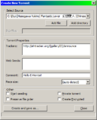 The settings used to make a torrent for uploading using μTorrent
 -
 Statistics visible in My Home


See also
| E-Hentai Galleries Navigation | ||
|---|---|---|
| Finding | Gallery Searching • Bounty System • Favorites • Making Requests | |
| Directory | Anthologies • Artist Recommendations | |
| Uploading | Making Galleries • Gallery Categories • Gallery Manager • Gallery Descriptions | |
| Downloading | Archives • Hentai@Home • EHTracker | |
| User Actions | Tagging | Fetish Listing • Know The Difference • Mechanics (Namespaces, Tag Creation) • My Tags • New Tags |
| Other | Commenting • Expunging • Mod Power • Rating • Renaming • Reporting | |
| Rewards | Credits • Gallery Points • Hath Perks • Toplists | |
| Viewing | Lo-Fi • Multi-Page Viewer | |
| System | API • Bans • FAQ • My Home • Technical Issues | |

