EHTracker/Making a New Torrent: Difference between revisions
→Create a New Torrent File: Disabled an unintentional internet link. |
|||
| Line 18: | Line 18: | ||
# Using the tool, select the bundle of files you wish to turn into a torrent for your chosen gallery. | # Using the tool, select the bundle of files you wish to turn into a torrent for your chosen gallery. | ||
# In the "trackers" field (which may be named something similar but not identical in your chosen torrent client), paste the customized EHTracker announcement URL unique to your chosen gallery. '''Make sure this tracker announce URL is correct | # In the "trackers" field (which may be named something similar but not identical in your chosen torrent client), paste the customized EHTracker announcement URL unique to your chosen gallery. '''Make sure this tracker announce URL is correct!''' | ||
#* This URL is most quickly found at the bottom of the "Torrent Download" pop-out window for a given gallery. [[File:EHTracker URL.png|250px|thumb|right|This is where the unique EHTracker announcement URL for a gallery is located on the the "Torrent Download" pop-out window.]] | #* This URL is most quickly found at the bottom of the "Torrent Download" pop-out window for a given gallery. [[File:EHTracker URL.png|250px|thumb|right|This is where the unique EHTracker announcement URL for a gallery is located on the the "Torrent Download" pop-out window.]] | ||
#* This URL can also be generated by following the format of: '''<nowiki>http://ehtracker.org/{galleryID}/announce</nowiki>''', where '''{galleryID}''' is the gallery ID number that E-Hentai has assigned to a specific gallery. | #* This URL can also be generated by following the format of: '''<nowiki>http://ehtracker.org/{galleryID}/announce</nowiki>''', where '''{galleryID}''' is the gallery ID number that E-Hentai has assigned to a specific gallery. | ||
Revision as of 07:54, 30 May 2023
This is a step-by-step guide explaining how to create a new torrent for a gallery using EHTracker.
Getting Started
Get a Torrent Client
A torrent client is a program which allows someone to interact with torrent files and the BitTorrent ecosystem in various ways. There are many torrenting clients available for various operating systems. Most of these clients will allow you to make a torrent file (an ability necessary to follow this guide).
Find a Gallery
There are several reasons why someone might want to make a torrent for an E-Hentai gallery. Many galleries which lack an associated torrent. These gallery cannot be downloaded via torrenting, unless a torrent is created for them. Additionally, some galleries may have torrents that are insufficient in some way (e.g. undersized images, images out of order, lacking additional non-image content, etc.).
Composing the Files
Making the Torrent
Create a New Torrent File

Once you have your bundle of files, return to your torrent client of choice. Somewhere in the client will be a tool for creating new torrent files; open this tool.
- Using the tool, select the bundle of files you wish to turn into a torrent for your chosen gallery.
- In the "trackers" field (which may be named something similar but not identical in your chosen torrent client), paste the customized EHTracker announcement URL unique to your chosen gallery. Make sure this tracker announce URL is correct!
- This URL is most quickly found at the bottom of the "Torrent Download" pop-out window for a given gallery.
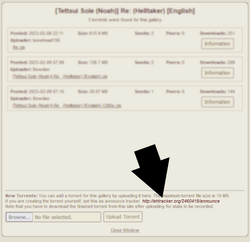
This is where the unique EHTracker announcement URL for a gallery is located on the the "Torrent Download" pop-out window. - This URL can also be generated by following the format of: http://ehtracker.org/{galleryID}/announce, where {galleryID} is the gallery ID number that E-Hentai has assigned to a specific gallery.
- This URL is most quickly found at the bottom of the "Torrent Download" pop-out window for a given gallery.
- The other fields do not need to be filled in. If you think there is something notable about your torrent (e.g. a file in your bundle of files that cannot be displayed by E-Hentai), you can add a comment about it if you wish.
- Options like "Piece size" may be left Automatic.
- The torrent does not need to be private or encrypted.
- For your own convenience, it is recommended to uncheck the option to "Begin seeding immediately" (or similar option). This will not affect your torrent file. It will stop your torrent client from trying to upload your torrent immediately. The reason why this is useful will be apparent soon.


